> ## Documentation Index
> Fetch the complete documentation index at: https://v3.captaindata.com/llms.txt
> Use this file to discover all available pages before exploring further.
# Workflow Launch Logic & Tips for Developers
> A quick guide to automating workflows via Captain Data's API, covering workflow logic, parameters, and how to retrieve results efficiently.
##
This guide is designed for developers looking to automate workflows using the Captain Data API.
It covers workflow logic, API integration, and tips for handling common challenges, ensuring seamless automation for your projects.
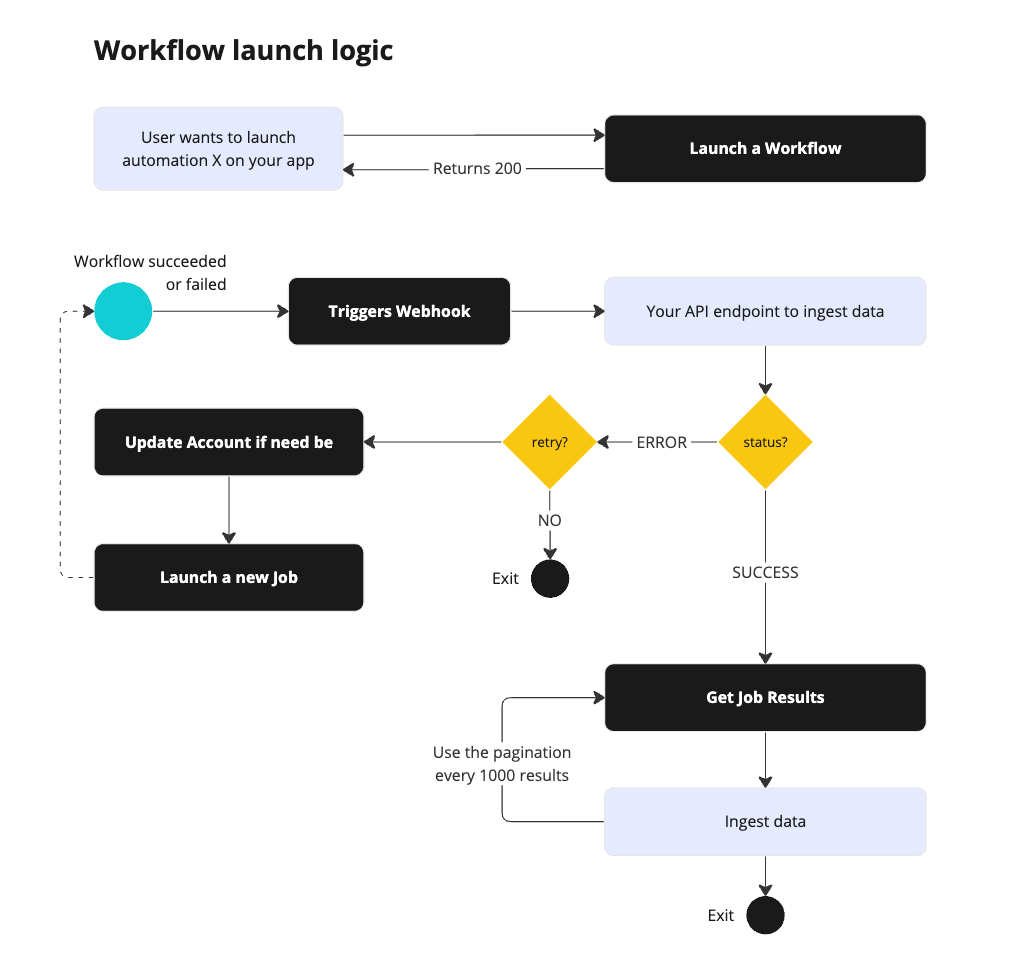 Key points:
* **Batch Processing**: Workflows process data in batches for efficient handling of large datasets.
* **Rate Limiting**: API calls are rate-limited for safe execution.
* **Webhooks**: Webhooks provide real-time updates for tracking progress and ingesting results.
## **Launching Workflows via API**
### **Step 1: Authenticate**
Authenticate using your **API key** and **Project UID**.
### **Step 2: Configure Workflow**
Define workflow parameters and inputs, and specify the workflow UID.
Example Payload:
```bash
curl --request POST --url https://api.captaindata.co/v3/workflows/{workflow_uid}/schedule
--header 'Authorization: '
--header 'Content-Type: application/json'
--header 'x-project-id: '
--data '{
"job_name": "Get Yann Lecun Linkedin Profile",
"steps": [
{
"accounts": ["xxxxxxx-63da-47f8-9a3c-53f2581d0ccb"],
"accounts_rotation_enabled": true,
"parameters": {},
"step_uid": "xxxxxx-xxxxx-451f-ac94-2b41972ec6a7"
}
],
"inputs": [
{ "linkedin_profile_url": "https://www.linkedin.com/in/yann-lecun/" }
],
"repeat_option": { "type": "minute", "value": 10 }
}'
```
### **Step 3: Launch**
Execute the request and enjoy the results.
## **Retrieving Run Results**
Use the [Get a Run's Results](/v3/api-reference/runs/get-job-results) endpoint to fetch workflow results.
Example Request:
```bash
curl --location ''
--header 'Authorization: x-api-key '
--header 'x-project-id: YOUR_PROJECT_UID'
```
Sample Response:
```json
{
"results": [
{
"linkedin_profile_url": "https://www.linkedin.com/in/yann-lecun",
"first_name": "Yann",
...
}
],
"paging": {
"previous": null,
"next": null,
"have_next_page": false
}
}
```
### Option 1. **Using Webhooks for Workflow Results**
Webhooks provide real-time updates on Run success or failure.
Example Flow:
1. Receive webhook with `job_uid`
2. Use [Get a Run Results](/v3/api-reference/runs/get-job-results) to fetch data
Read more on how-to [Create & Manage Webhooks](/v3/webhooks/create-manage).
### Option 2. **Polling Data**
You can track a Run's progress with the [GET a Run](/v3/api-reference/runs/get-workflow-job) endpoint.
Example Request:
```bash
curl --location ''
--header 'Authorization: x-api-key '
--header 'x-project-id: YOUR_PROJECT_UID'
```
The response includes:
* `error_message` A message to help debug issues and retry Runs.
* `status`: Indicates the workflow's progress or completion.
```json
{
"uid": "xxxxxxxxxxx-xxxxx-49be-9e21-d8037d1e393b",
"name": "Test job via API",
"status": "finished",
"start_time": "2024-11-26T18:21:03.019011+00:00",
"scheduled_time": null,
"finish_time": "2024-11-26T18:21:09.082904+00:00",
"row_count": 1,
"total_row_count": 1,
"error_message": null,
"workflow_name": "Extract LinkedIn People Profile",
"workflow_uid": "xxxxxxxx-xxxxxx-4eeb-ada7-652fb498f540",
"main_job_uid": null,
"main_job_name": null,
"configuration": {
"steps": [
{
"accounts": [
"xxxxxxxx-xxxxx-4692-9d6d-e97ac1544308"
],
"parameters": {},
"workflow_template_uid": "xxxxxxx-xxxxx-483f-b220-0fcccfdd14b2",
"accounts_rotation_enabled": false
}
]
},
"accounts": [
"xxxxxx-xxxxx-4692-9d6d-e97ac1544308"
],
"number_inputs": 1,
"step_uid": null
}
```
If you want to implement polling to access a Run's results before the Run is
fully finished read our article [Polling Data](/v3/webhooks/polling-data).
## **Tips for Developers**
* **Handle Rate Limits**: Retry with exponential backoff.
* **Debug Efficiently**: Store `job_uid` for traceability.
* **Explore Workflow Schema**: Validate inputs/outputs via the API.
## **Workflows Schemas**
Use the [GET - Get Workflow Details](/v3/api-reference/workflows/get-workflow) endpoint to retrieve schema details.
```bash
https://api.captaindata.co/v3/workflows/:workflow_uid/details
```
This will give you, **for each step of the flow**:
* **Input fields:** Required input data for each step.
* `variations`: other accepted field names which are generally retro keys to ensure compatibility (they are also displayed under `retro_variations`)
* `regex`: the criteria the input must match with
* `primary`: if primary, the key is necessary for the step to run
* `help`: the help sentence displayed on the platform or returned if your input schema is false
* **Output schema:** Data model returned by the Action.
* **Parameters schema:** Optional input parameters to control the Action's behavior, e.g. `max_results`
Key points:
* **Batch Processing**: Workflows process data in batches for efficient handling of large datasets.
* **Rate Limiting**: API calls are rate-limited for safe execution.
* **Webhooks**: Webhooks provide real-time updates for tracking progress and ingesting results.
## **Launching Workflows via API**
### **Step 1: Authenticate**
Authenticate using your **API key** and **Project UID**.
### **Step 2: Configure Workflow**
Define workflow parameters and inputs, and specify the workflow UID.
Example Payload:
```bash
curl --request POST --url https://api.captaindata.co/v3/workflows/{workflow_uid}/schedule
--header 'Authorization: '
--header 'Content-Type: application/json'
--header 'x-project-id: '
--data '{
"job_name": "Get Yann Lecun Linkedin Profile",
"steps": [
{
"accounts": ["xxxxxxx-63da-47f8-9a3c-53f2581d0ccb"],
"accounts_rotation_enabled": true,
"parameters": {},
"step_uid": "xxxxxx-xxxxx-451f-ac94-2b41972ec6a7"
}
],
"inputs": [
{ "linkedin_profile_url": "https://www.linkedin.com/in/yann-lecun/" }
],
"repeat_option": { "type": "minute", "value": 10 }
}'
```
### **Step 3: Launch**
Execute the request and enjoy the results.
## **Retrieving Run Results**
Use the [Get a Run's Results](/v3/api-reference/runs/get-job-results) endpoint to fetch workflow results.
Example Request:
```bash
curl --location ''
--header 'Authorization: x-api-key '
--header 'x-project-id: YOUR_PROJECT_UID'
```
Sample Response:
```json
{
"results": [
{
"linkedin_profile_url": "https://www.linkedin.com/in/yann-lecun",
"first_name": "Yann",
...
}
],
"paging": {
"previous": null,
"next": null,
"have_next_page": false
}
}
```
### Option 1. **Using Webhooks for Workflow Results**
Webhooks provide real-time updates on Run success or failure.
Example Flow:
1. Receive webhook with `job_uid`
2. Use [Get a Run Results](/v3/api-reference/runs/get-job-results) to fetch data
Read more on how-to [Create & Manage Webhooks](/v3/webhooks/create-manage).
### Option 2. **Polling Data**
You can track a Run's progress with the [GET a Run](/v3/api-reference/runs/get-workflow-job) endpoint.
Example Request:
```bash
curl --location ''
--header 'Authorization: x-api-key '
--header 'x-project-id: YOUR_PROJECT_UID'
```
The response includes:
* `error_message` A message to help debug issues and retry Runs.
* `status`: Indicates the workflow's progress or completion.
```json
{
"uid": "xxxxxxxxxxx-xxxxx-49be-9e21-d8037d1e393b",
"name": "Test job via API",
"status": "finished",
"start_time": "2024-11-26T18:21:03.019011+00:00",
"scheduled_time": null,
"finish_time": "2024-11-26T18:21:09.082904+00:00",
"row_count": 1,
"total_row_count": 1,
"error_message": null,
"workflow_name": "Extract LinkedIn People Profile",
"workflow_uid": "xxxxxxxx-xxxxxx-4eeb-ada7-652fb498f540",
"main_job_uid": null,
"main_job_name": null,
"configuration": {
"steps": [
{
"accounts": [
"xxxxxxxx-xxxxx-4692-9d6d-e97ac1544308"
],
"parameters": {},
"workflow_template_uid": "xxxxxxx-xxxxx-483f-b220-0fcccfdd14b2",
"accounts_rotation_enabled": false
}
]
},
"accounts": [
"xxxxxx-xxxxx-4692-9d6d-e97ac1544308"
],
"number_inputs": 1,
"step_uid": null
}
```
If you want to implement polling to access a Run's results before the Run is
fully finished read our article [Polling Data](/v3/webhooks/polling-data).
## **Tips for Developers**
* **Handle Rate Limits**: Retry with exponential backoff.
* **Debug Efficiently**: Store `job_uid` for traceability.
* **Explore Workflow Schema**: Validate inputs/outputs via the API.
## **Workflows Schemas**
Use the [GET - Get Workflow Details](/v3/api-reference/workflows/get-workflow) endpoint to retrieve schema details.
```bash
https://api.captaindata.co/v3/workflows/:workflow_uid/details
```
This will give you, **for each step of the flow**:
* **Input fields:** Required input data for each step.
* `variations`: other accepted field names which are generally retro keys to ensure compatibility (they are also displayed under `retro_variations`)
* `regex`: the criteria the input must match with
* `primary`: if primary, the key is necessary for the step to run
* `help`: the help sentence displayed on the platform or returned if your input schema is false
* **Output schema:** Data model returned by the Action.
* **Parameters schema:** Optional input parameters to control the Action's behavior, e.g. `max_results`